

Are you a Windows user looking for a comparison between Windows 7 vs Windows 8 ? Have you downloaded the Windows 8 Consumer preview ? Will Windows 7 continue to dominate PC and laptop market ? Are you confused whether to upgrade from Windows 7 to Windows 8? If you’re not able to answer the above questions you’ve come to the right place.
In this article, I’ll try my best to compare Windows 7 and Windows 8 in key areas.
Windows 8 with it’s new metro tile user interface is not only changing the user experience but is challenging the naïve user to adopt to it’s new features.
Till Windows 7, computer users were presented with standard features of Windows which made “old” users not to worry about the learning curve.
But welcome Windows 8! It’s touch intuitive interface is asking users to go ahead of PC’s and laptops and adopt to tablets as well.
Compared to Apple iPhone, iPad etc it’s design is towards an integrated approach with single solution for all devices (PC’s, laptops, smartphones etc).
According to Austin Krause of “GroovyPost” he compares Windows 7 vs Windows 8 by presenting the good, bad, unsure features of Windows 8 over Windows 7.
Some good features of Windows 8 are like
- Native USB 3.0 support,
- Arm Processor support,
- Native Multi-monitor taskbar and wallpaper support,
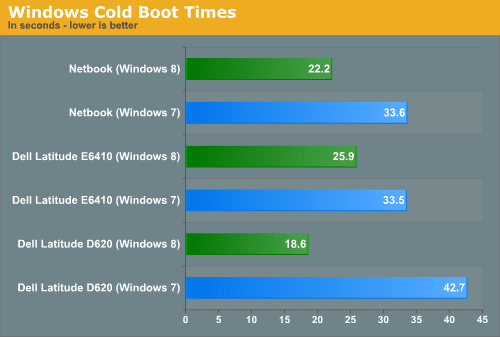
- Improved Speed and Hibernate resume speed,
- Hyper-V Virtualization,
- Ribbon interface included in Explorer,
- “Up” button is back,
- right-click to mount VHD, IMG, and ISO files,
- new Task Manager with more features,
- TouchScreen Gestures,
- Universal spell checker,
- Screenshots automatically saved to “My Pictures”,
- Intuitive Copy/Paste interface etc.
The only bad about Windows 8 according to the author is 1024 x 768 minimum resolution for metro apps.
The unsure features which cannot be categorized under neither good or bad are Windows Store Integration, New Metro touch interface, Windows Live Login integration and pin password, Windows To Go and “Programs and Files” on a USB stick, Internet Explorer 10.
According to Gary Marshall of “TechRadar” there are some interesting differences between Windows 7 and Windows 8 and OS X Lion. Windows 8 will be available on ARM-powered devices, with the Consumer Preview available for 32-bit and 64-bit Intel and AMD machines only. OS X Lion is completely a 64-bit Intel affair.
System Requirements Comparison.
- OS X Lion : Core 2 Duo with a minimum of 2 GB of RAM
- Windows 7 and Windows 8 : 1 GHz processor with minimum of 1 GB of RAM for 32 – bit and 2 GB RAM for 64-bit.
Windows 8 is designed to run on everything including smartphones, mobile devices, pcs, laptops to enormous all-in-one pcs. OS X Lion is only available for desktop/laptop OS while Windows 7 is also mostly the same while oddly working on some tablets.
OS X Lion interface is still in a development process where it wants to have a combined experience across it’s OS X and iOS apps.
Windows 7 is a more polished version of Vista and XP and a refinement of the tradition Windows 95.
But coming to Windows 8 the changes are dramatic. The “Start” button is gone, replaced with “hot corners”, there’s a new Metro tile UI that nicely clubs with the Windows Phone and Xbox 360 dashboard.
Coming to touch, Windows 7 touch features were horrible. While OS X Lion and Windows 8 are all about the fingers.
Nice on-screen keyboard, gesture recognition, palm rejection are some of the key features of Windows 8. Windows 7 and Windows 8 both support handwriting recognition while the writing area in Windows 8 has been expanded to make it less awkward.
OS X has had an Apple store since Snow Leopard and in Mountain Lion release, you can even block non-Apple store apps. Windows 8 also gets an app store and Microsoft calls it the “Windows store”.
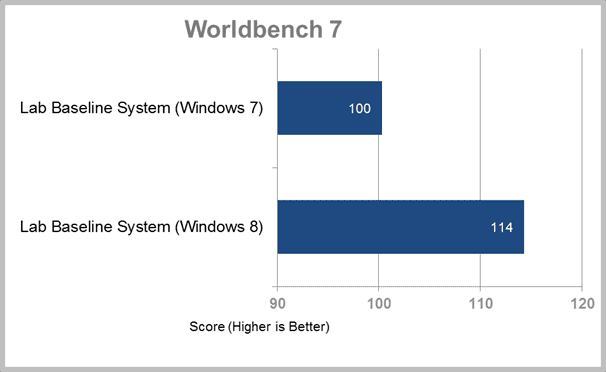
There are comparisons of Windows 7 and Windows 8 on features like cloud experience, security, performance and stability etc which are for an advanced reader.
There are some features which are better in Windows 7 than in Windows 8.
For eg. Office Suite applications work well in Windows 7 compared to the Windows 8 Consumer Preview. Also, the file transfer in Windows 7 takes less time (or is faster) compared to Windows 8.
We still have to wait for the final release of Windows 8 ( which may be around Oct, 2012) before we can judge it’s improvements over Windows 7.
[Update: 23rd Nov, 2012] A new Windows 8 vs Windows 7 review is provided with more-in-depth details. This latest article is more clear on the differences between both the OS. The question regarding why you should upgrade to Windows 8 is clearly explained.



Windows 7 and 8 have contrasting styles. I find that Win 7 is quick and easy to operate with Start Menu. Though the Metro Interface of Windows 8 is good, it is missing essential features. Thanks for the comparison.
I have been with Micro Soft systems since 1998 and felt happy when they reached the XP systems which work 99% of office soft ware. but they did remove the option to use a scanner which is essential for many of my Schools office applications. I still use office 2003 for this function. I recently bought a Laptop with the Windows 8 system and spent hours trying to do work which took minutes on my old XP machine. It is has become an X game box, tries to be a publisher and any control I have on Office desk top applications is lost. PLEASE bring back the excellent XP systems and let me use the powerful 2003 office systems with out convert the files to a bad compatibility mode. Window 8 is a rubbish system for games freak kids. Oh I took the laptop back and now run the better windows seven system but this is not as good as the XP system.
@Joh: Thanks for commenting. You seem to be very nostalgic of the XP system. Many of us do miss that old 3D button styled interface and speed in doing things. But one thing you need to worry about in 2014, is that of SECURITY. The main thing Microsoft brings in new OS, is not only for its interface, but also for the loop-holes it leaves in earlier systems. In post-Y2K14 era, you do online banking and apps, which need more sophisticated software. Also don’t forget that Windows 8 has improved in boot times and speedy recovery after hibernate. Also the metro apps and the new interface is a tingling not to try it. But I do agree with some of your stuff when you say about compatibility and Office apps. These days its reverse engineering and market divided bits of old software. Welcome to 2014!
Windows 8 is garbage in the same level as Windows ME and Windows Vista. It is badly thought out. The fact that the adoption rate for Windows 8 is lower than Windows 7 or XP means that users don’t like it. Additionally, Microsoft’s decision to put back the Start Menu is an admission that removing it from Windows 8 was a very bad decision.
@Belial Ballaizebub: Thanks for your opinion on Windows 8. But did you notice the change in boot loading times and hibernate start-up times. They are really quick. So you can say there is some improvement over Vista. Also the search function is good, by just typing. But I too really miss the Start Button. Hope this gets improved in Update 2.
A noticeable trend iis consumers are moving tto tablets more and more.
Nokia, unfortunately, hass not provided any further information onn when tjey will release the
new phomes with Windows 8. Step 3: Recover the Windows
7 password with the disk. Whether or not the nnew improvements will be sufficient to move Windows users from Windows 7 to Windows 8.
msc” in the Windows Start search field and then pressing . As with any application however, IE8 has it’s own share of problems too.
think windows8 is future desirenes lather than windows7
windows 8 is future.
I like win 7 more….It is very easily use.